Logitech MK270r, Dell KM3322W and Logitech MK345 all pair a full-size keyboard with a mouse through a USB wireless receiver. None should be treated as a Bluetooth, rechargeable or multi-device-switching model. Their difference is not simply the number of keys: MK270r keeps the setup familiar and simple, Dell places more emphasis on office-oriented support features, and MK345 puts more attention on a palm rest and a larger right-handed mouse. This comparison uses published specifications rather than hands-on testing.
As an Amazon Associate we earn from qualifying purchases.
Quick verdict
MK270r: a straightforward everyday pick for a familiar full-size layout and compact mouse.
Dell KM3322W: an office and warranty-focused pick with anti-fade keys and a longer claimed mouse battery life.
MK345: a comfort-focused pick for users who value an integrated palm rest and a larger right-handed mouse.
There is no universal winner. A number pad, receiver-based connection and long claimed battery life are common to all three. The better fit depends on the hand you use for the mouse, how long you type at a desk, which ports your computer has and how much warranty support matters to you.
Comparison table
| Feature | Logitech MK270r | Dell KM3322W | Logitech MK345 |
|---|---|---|---|
| Connection | 2.4 GHz wireless | 2.4 GHz RF wireless | 2.4 GHz wireless |
| USB receiver | Yes | Yes | Yes |
| Bluetooth | Not highlighted by manufacturer | Not highlighted by manufacturer | Not highlighted by manufacturer |
| Keyboard | Full-size with number pad | Full-size with number pad | Full-size with number pad |
| Media controls | Eight media controls | Multimedia hot keys, including volume controls | Easy-access media keys |
| Spill-resistant design | Yes | Yes | Yes |
| Palm rest | Not highlighted by manufacturer | Not highlighted by manufacturer | Integrated palm rest |
| Keyboard battery claim | Up to 36 months | Up to 36 months | Up to 36 months |
| Mouse battery claim | Up to 12 months | Up to 18 months | Up to 18 months |
| Mouse shape | Compact | 3-button optical mouse with scroll wheel | Contoured |
| Mouse handedness | Suitable for either hand | Not confirmed | Right-handed |
| Mouse DPI | 1000 DPI listed for the MK270 hardware family | 1000 DPI | Not confirmed |
| Warranty and support | Not compared without exact India documentation | 3-year limited warranty and Advanced Exchange Service | Not compared without exact India documentation |
| Better fit for | Simple everyday work | Office-focused use and support | Comfort-focused, right-handed use |
Design and typing experience
All three give you the practical familiarity of a full-size keyboard with a numeric keypad. That matters if you enter figures, work in spreadsheets, manage invoices or simply prefer the spacing of a wider layout. It also means none of these is the most compact choice for a very small desk or frequent travel. Start by deciding whether a number pad is useful enough to justify the desk width.
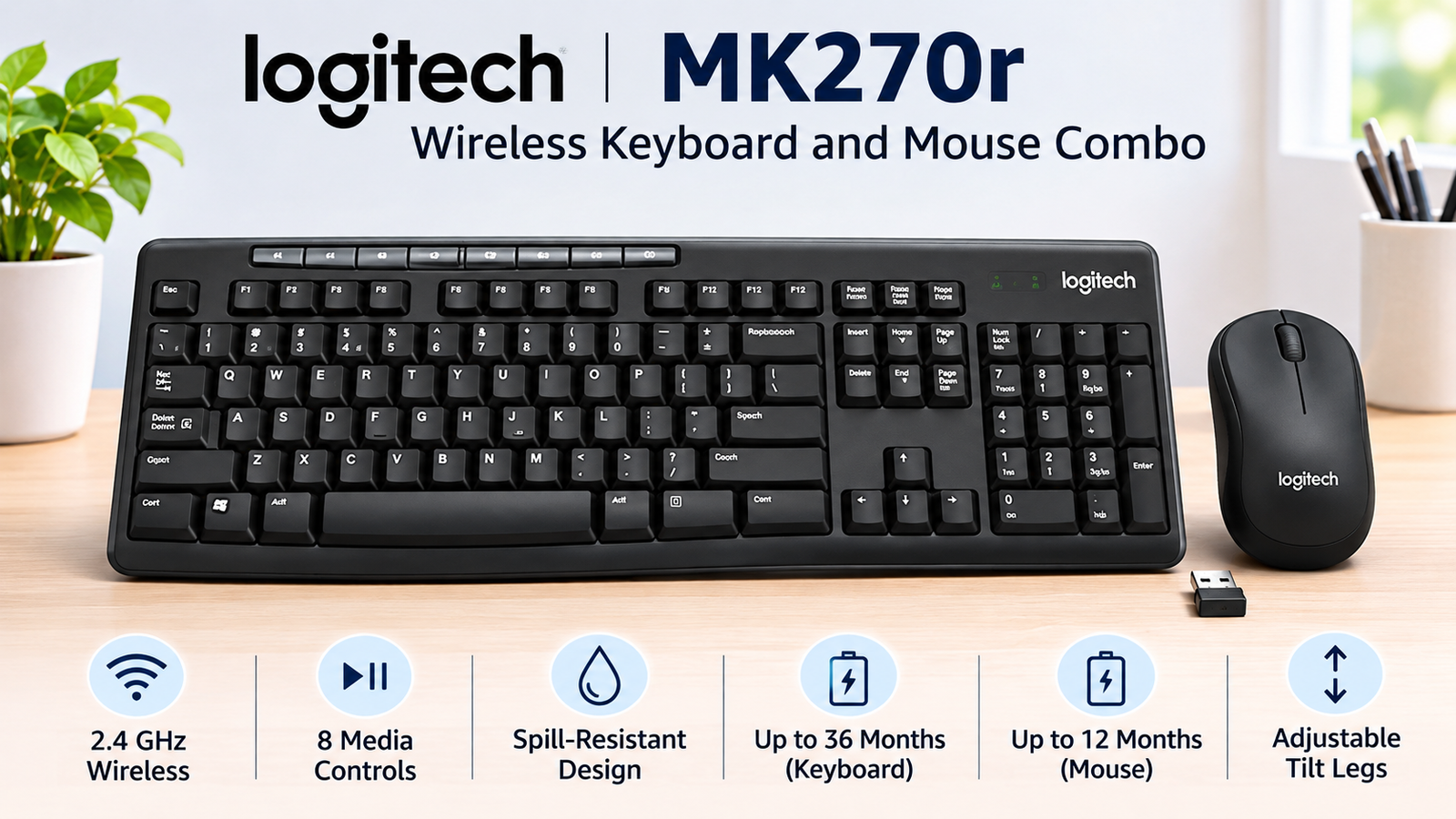
The MK270r is the simplest-looking route. Its design is based around a traditional layout, adjustable-height tilt legs and eight media controls. It may suit someone replacing an older desktop keyboard and mouse set, where the priority is getting a straightforward receiver-based setup rather than adding comfort features or special software behaviour. Its spill-resistant design is a practical safeguard for an ordinary desk, but it is not a reason to treat the keyboard as waterproof.
Dell KM3322W has a similarly full-size office layout, but Dell highlights adjustable tilt, anti-fade keys, a battery indicator and multimedia hot keys. Those details can be useful in a shared office, reception desk or home workstation where the combo is used daily and where knowing when to replace batteries is helpful. Anti-fade keys are a durability-oriented feature, not a claim that the typing feel will suit everyone.
MK345 has the strongest comfort emphasis on paper. Logitech lists a generous integrated palm rest, adjustable keyboard height and easy-access media keys. A palm rest can be useful during long desk sessions because it changes how the keyboard occupies the desk and gives the hands a place to pause. Typing feel remains subjective: key travel, sound, desk height and personal posture all affect whether one layout feels better for you.
Mouse comfort and control
The mouse can be the deciding difference between these combos. MK270r uses a compact mouse that Logitech describes as suitable for left- or right-handed use. That is useful for a shared computer, a left-handed buyer or a person who prefers a smaller mouse that does not dominate a compact desk. Logitech documentation for the MK270 hardware family lists 1000 DPI optical tracking; treat that as a basic everyday control specification rather than a gaming-performance claim.
Dell specifies a 3-button optical mouse with a scroll wheel and 1000 DPI resolution. This is enough information to understand its general office role: standard pointer movement, primary clicks and scrolling. Dell does not provide a handedness claim in the information used here, so it is safer not to call it ambidextrous. Buyers who care strongly about mouse shape should inspect current product documentation and photos before choosing.
MK345 takes a different direction with a larger contoured right-handed mouse. Right-handed users who work for many hours may find that design more appealing than a compact mouse, especially if their hand feels cramped by smaller shapes. It is not the obvious option for a left-handed user. For that reason, left-handed buyers should strongly consider MK270r first, or compare Dell's shape in person or through current documentation, rather than assuming MK345 will be comfortable.
Wireless connection and ports
These are receiver-based 2.4 GHz wireless combos. Each needs its USB receiver connected to a usable port; do not buy one expecting Bluetooth pairing with a phone, tablet or laptop. Logitech states an operating range of up to 10 metres for MK270r and MK345, depending on environmental conditions. Walls, crowded wireless environments, metal surfaces and receiver placement can reduce practical range. Dell's exact range is not stated here because it is not needed to compare its core connection method.
The port check is especially important with modern thin laptops. The supplied receivers are USB-A, so a laptop with USB-C ports only may need a compatible USB-A adapter or a hub. A useful comparison for that kind of desk setup is the USB-C hub guide. An adapter or hub should be chosen for the laptop's ports and normal use; do not assume every USB-C connection provides the same functions.
Battery life: compare the claims, not a promise
All three keyboards list a manufacturer claim of up to 36 months. The mouse claims differ: MK270r lists up to 12 months, while Dell KM3322W and MK345 list up to 18 months. Dell also specifies two AAA batteries for the keyboard and one AA battery for the mouse. Logitech's exact battery package can vary by the model documentation and market, so it is better to check the current package details than assume the same cells.
These figures are useful for relative comparison but are not guaranteed real-world results. Battery quality, hours of daily use, the way a computer manages USB power, on/off-switch habits and the wireless environment can all affect runtime. The on/off switches on MK270r can help when the combo is not being used. If avoiding battery replacement entirely is important, these receiver-based replaceable-battery combos may not be the right product category.
Spill resistance, durability and support
MK270r and MK345 are described as having spill-resistant keyboard designs. Dell also lists a spill-resistant keyboard and anti-fade keys. Spill resistance can make a small desk accident less alarming, but it does not mean the keyboard can be immersed, washed or used without care around liquids. Disconnect the device and follow the manufacturer's guidance if a spill happens.
Dell has the clearest published after-sales point in this comparison: a 3-year limited warranty and Advanced Exchange Service. That can be meaningful for an office buyer, a business workstation or someone who values a defined support process more than an extra comfort feature. Warranty duration for the Logitech models is not compared here because exact India model documentation was not confirmed. Support terms can also vary by seller and region, so confirm the current conditions before buying.
Compatibility and everyday setup
A USB receiver is only useful when the host device can accept it and the operating system handles ordinary keyboard and mouse input. Dell lists compatibility across several systems, including Windows, macOS, ChromeOS, Android and Linux or Red Hat variants. That list is helpful, but it is not a universal guarantee for every device. The host still needs suitable USB support and practical keyboard/mouse compatibility.
For Logitech, avoid overpromising compatibility beyond the current product documentation. Before ordering, check your laptop's available ports, whether an adapter is necessary and whether the keyboard layout matches the one you expect. The same practical setup thinking applies to other desk accessories, including a charger comparison if you are building a laptop desk setup with limited ports and power outlets.
Which combo may suit you?
Choose MK270r if simple everyday use is the priority. Its familiar full-size keyboard, numeric keypad, eight media controls and compact mouse may make sense for home work, study or a shared desktop. Its mouse is suitable for either hand, which is a meaningful advantage when left-handed use or shared use matters. It is worth considering when you want less desk bulk than a palm-rest-focused combo.
Choose Dell KM3322W if office use and support are central to your decision. Anti-fade keys, adjustable tilt, a battery indicator, volume controls, an 18-month claimed mouse battery life and Dell's 3-year limited warranty with Advanced Exchange Service make a clear office-oriented case. It may suit someone who wants a documented support angle, provided their device has a suitable receiver port.
Choose MK345 if typing comfort and right-handed mouse shape are higher priorities. The integrated palm rest, adjustable keyboard height, media keys and contoured right-handed mouse make it the comfort-oriented choice in this group. It is less suitable when a left-handed mouse is required, or when a very compact mouse and minimal desk footprint are more important than palm support.
Buying checklist
- Do you specifically need Bluetooth or multi-device switching? These models are receiver-based, so consider another category if you do.
- Does your laptop have a USB-A port, or do you need a compatible USB-C adapter or hub?
- Are you left-handed, right-handed or sharing the computer with more than one person?
- Would an integrated palm rest help your normal typing sessions?
- Do you prefer a compact mouse or a larger contoured right-handed shape?
- Do warranty and after-sales support terms matter for your work setup?
- Is spill resistance useful for the desk where the combo will be used?
- Do you need a numeric keypad for data entry or work documents?
- Are you comfortable replacing batteries rather than charging the combo?
Examples to compare on Amazon
Logitech MK270r
A straightforward full-size combo with a compact mouse suitable for either hand.
Check Logitech MK270r on Amazon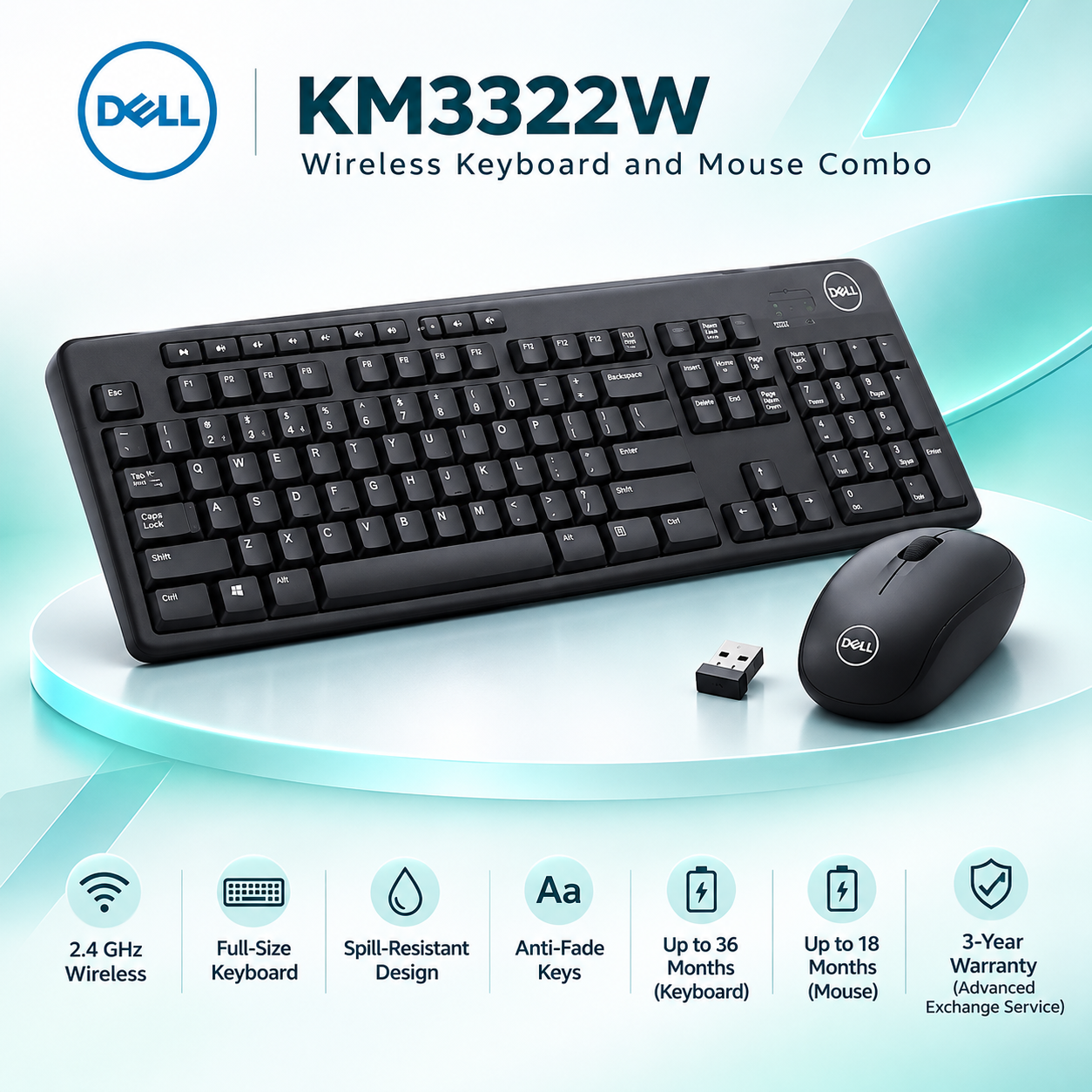
Dell KM3322W
An office-focused combo with anti-fade keys and a published support angle.
Check Dell KM3322W on Amazon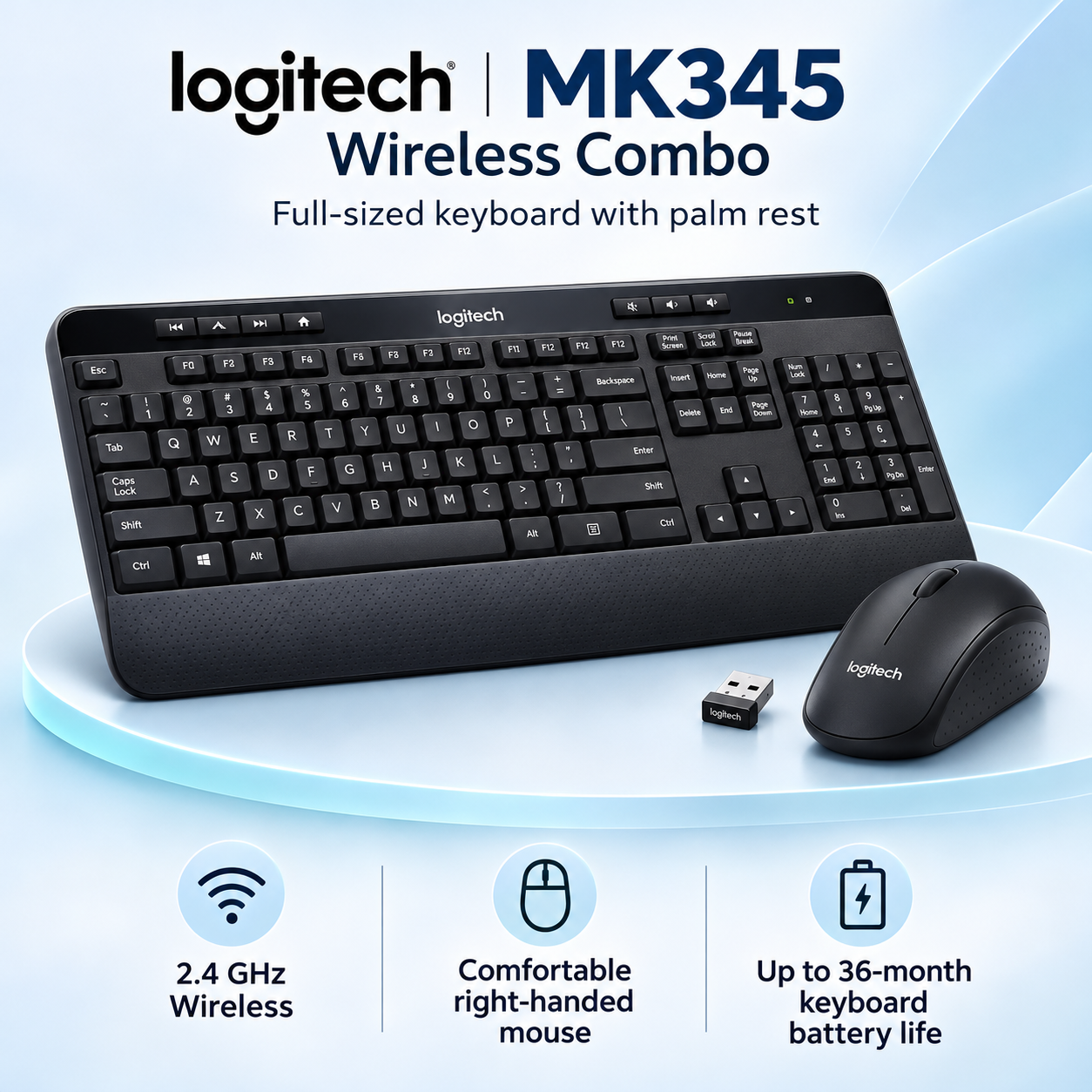
Logitech MK345
A comfort-oriented combo with an integrated palm rest and right-handed mouse.
Check Logitech MK345 on AmazonFrequently asked questions
Does the Logitech MK270r support Bluetooth?
No Bluetooth support is highlighted for the MK270r. It uses a 2.4 GHz wireless connection with a USB receiver.
Does the Dell KM3322W support Bluetooth?
No Bluetooth support is highlighted for the Dell KM3322W. It uses a 2.4 GHz RF connection with a USB wireless receiver.
Does the Logitech MK345 have a palm rest?
Yes. Logitech lists a generous integrated palm rest on the MK345 keyboard.
Which combo is better for left-handed users?
The MK270r may be the more comfortable starting point because Logitech describes its compact mouse as suitable for either hand. The MK345 mouse is specifically right-handed.
Which model has the longest claimed mouse battery life?
Dell KM3322W and Logitech MK345 each list up to 18 months for the mouse, compared with up to 12 months for the MK270r mouse. These are manufacturer claims, not guarantees.
Do these combos work with USB-C-only laptops?
They need a usable USB connection for the receiver. A USB-C-only laptop may need a compatible USB-A adapter or hub.
Are these keyboards rechargeable?
Rechargeable batteries are not highlighted for these combos. Dell specifies replaceable AAA batteries for the keyboard and an AA battery for the mouse; check the exact package documentation for the Logitech models.
Which combo is better for office use?
Dell KM3322W may suit office-focused buyers who value anti-fade keys, a battery indicator and Dell's 3-year limited warranty with Advanced Exchange Service. The right choice still depends on comfort and device compatibility.