These three 7-in-1 USB-C hubs are designed to turn one compatible USB-C port into a more useful desk or travel setup. On paper, each combines HDMI, USB ports, USB-C Power Delivery input and SD or microSD card access. The important difference is the port arrangement: Wozoyo and Honeywell list one higher-speed USB-A port plus two USB 2.0 ports, while Ambrane EHub 7i lists two USB-A 3.0 ports and a separate USB-C data port. This guide compares published specifications, not hands-on testing or changing prices.
As an Amazon Associate I earn from qualifying purchases.
Quick answer
Choose Wozoyo for a balanced feature list with listed 4K@60Hz HDMI, 5Gbps USB-A, card readers and 100W PD input. Choose Honeywell if the listed three-year warranty and a simple mix of HDMI, one USB 3.0 and two USB 2.0 ports are priorities. Choose Ambrane EHub 7i if you need more listed high-speed peripheral connections, including two USB-A 3.0 ports and one USB-C 5Gbps data port.
Quick comparison table
| Feature | Wozoyo 7-in-1 | Honeywell 7-in-1 | Ambrane EHub 7i |
|---|---|---|---|
| Total ports | 7 listed | 7 listed | 7 listed |
| HDMI | Yes; listing states 4K@60Hz | Yes; 4K HDMI output | Yes; listing states 4K@60Hz |
| USB-A ports | 1 × USB 3.2 Gen 1 5Gbps; 2 × USB 2.0 | 1 × USB 3.0; 2 × USB 2.0 | 2 × USB-A 3.0, listed at up to 5Gbps |
| USB-C data port | Not clearly specified; USB-C port is PD input | Not clearly specified; USB-C port is PD input | 1 × USB-C data port, listed at up to 5Gbps |
| PD charging | Up to 100W PD input/pass-through listed | Up to 100W PD input listed | Up to 100W PD input listed |
| Card readers | SD and TF | SD and microSD | SD and TF/microSD |
| Warranty | 2-year warranty listed | 3-year warranty listed | 6-month warranty listed |
| Best suited for | Balanced HDMI, cards and basic peripherals | Warranty-conscious basic expansion | More high-speed USB peripherals |
What is a 7-in-1 USB-C hub?
A basic USB hub mostly adds USB ports. A USB-C multiport adapter adds several different connections through one USB-C cable, such as HDMI, charging and memory-card slots. “Docking station” is often used for the same compact category, although larger docks can add Ethernet, multiple displays or their own power supply. These three are compact multiport hubs: they depend on the capability of the USB-C port on the laptop, tablet or phone they are connected to.
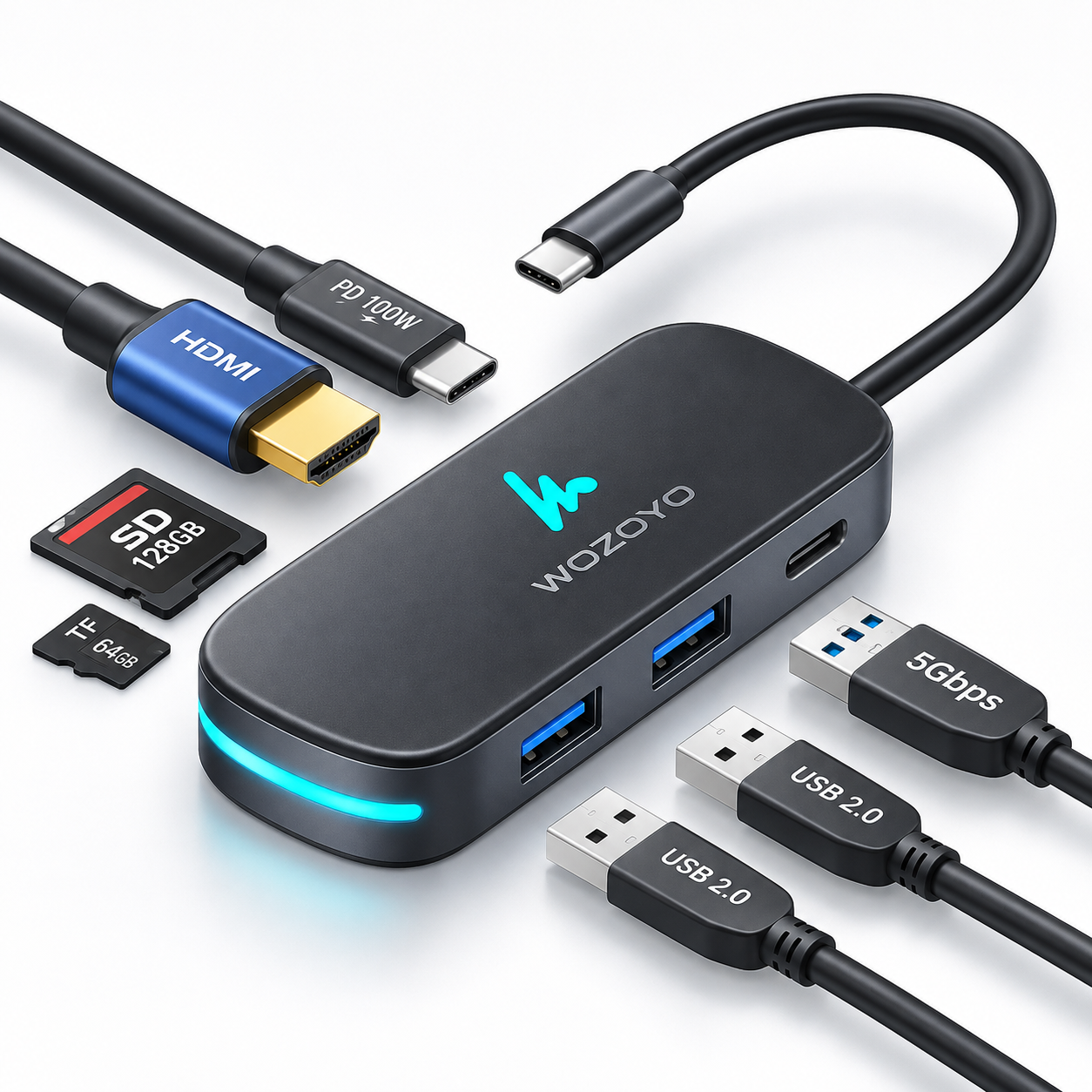
Wozoyo Type C 7-in-1 Docking Station
According to Wozoyo’s published product information, this hub provides HDMI, one USB 3.2 Gen 1 USB-A port rated up to 5Gbps, two USB 2.0 ports, SD and TF readers, and a USB-C PD input rated up to 100W. The listing states 4K@60Hz HDMI output and a two-year warranty. Its data layout makes sense for one faster external drive or flash drive alongside a mouse and keyboard.
The listing also says it is compatible with Thunderbolt 4 devices. That should be read as host compatibility, not as proof that the hub is a certified Thunderbolt 4 dock or that it provides full Thunderbolt bandwidth. It is designed to work with compatible USB-C and Thunderbolt-equipped hosts. As with any USB-C display adapter, the host needs compatible video output for HDMI to work.
Advantages: the published feature list balances a 5Gbps data port, two basic peripheral ports, HDMI, card readers and PD input. Limitations: it has only one listed 5Gbps USB-A data port, and the USB-C connection is described as PD rather than a separate data port. Choose it when you need a compact, balanced setup rather than several high-speed storage connections.
Honeywell 7-in-1 Type-C Docking Station
Honeywell lists one HDMI port with 4K output, one USB 3.0 port up to 5Gbps, two USB 2.0 ports up to 480Mbps, a Type-C PD 3.0 charging port rated up to 100W, and SD plus microSD slots. It also lists plug-and-play operation, hot swap support and a three-year limited warranty. The warranty is a meaningful differentiator for buyers who place service coverage high on their checklist.
Its HDMI description should be treated conservatively: the exact product information establishes 4K HDMI output, but not a verified 4K@60Hz claim. That does not make it unsuitable for an external display; it simply means buyers who specifically need 4K at 60Hz should confirm the current exact-model documentation and their laptop’s capability before ordering.
Advantages: clear everyday port selection, a 5Gbps USB-A port, both card-reader formats and the longest listed warranty in this comparison. Limitations: the two remaining USB-A ports are USB 2.0, and a separate USB-C data port is not clearly specified. It suits a desk using a mouse, keyboard, printer and occasional storage more than a setup with several fast drives.
Ambrane EHub 7i 7-in-1 Type-C Docking Station
Ambrane lists the EHub 7i with HDMI at up to 3840 × 2160 at 60Hz, two USB-A 3.0 ports up to 5Gbps, one USB-C 5Gbps data port, a USB-C PD input up to 100W, and SD plus TF card slots. It also lists a Display Switch feature. Its specific use should be confirmed from the supplied instructions; it should not be treated as a universal desktop-mode promise for every host device.
This is the strongest port arrangement here for someone connecting multiple faster peripherals. For example, an SSD can use one 5Gbps port while another higher-speed flash drive, card reader or accessory remains available. The USB-C data port can be useful when a device or cable uses USB-C instead of USB-A. Its official page lists a six-month warranty, so support coverage is shorter than the other two listed options.
Advantages: two listed 5Gbps USB-A ports, an additional 5Gbps USB-C data port, 4K@60Hz HDMI claim, PD input and both card slots. Limitations: the port count does not make every host compatible, and its listed warranty period is shorter. It is a practical choice for buyers whose priority is data-port flexibility rather than warranty length.
Why the USB port layout matters
USB 3.x ports are the better fit for external SSDs, external hard drives, faster flash drives and larger file transfers because they offer a higher listed data rate than USB 2.0. USB 2.0 remains perfectly suitable for a mouse, keyboard, printer, webcam or other basic peripheral. In a simple work-from-home setup, two USB 2.0 ports may be all you need.
The difference becomes more important when an SSD, camera-card transfer and other accessories share the hub. Wozoyo and Honeywell each provide one higher-speed USB-A connection in their published layouts. Ambrane lists three higher-speed data connections in total: two USB-A and one USB-C. That is an advantage for a peripheral-heavy setup, but it is not automatically useful if you only connect a keyboard and mouse.
HDMI and external-monitor compatibility
Wozoyo and Ambrane list HDMI output up to 4K@60Hz. Honeywell lists 4K HDMI output, with refresh rate not clearly specified in the official exact-model information reviewed for this guide. These figures describe the hub capability under suitable conditions, not a promise for every computer, monitor or cable.
For HDMI output, a laptop or phone USB-C port generally needs to support video output such as DisplayPort Alt Mode or another compatible display-output implementation. The operating system, display resolution, HDMI connection, cable or adapter implementation can also affect the usable result. A USB-C charging port, or a USB-C data-only port, may not provide external video at all.
Charging and 100W PD explained
“100W PD” usually refers to the maximum Power Delivery input or pass-through specification that the hub supports. It does not mean every laptop automatically receives 100W. Actual charging can depend on the charger’s output, the USB-C cable, the laptop’s power requirement, the host’s charging limits and the hub’s own power overhead.
For a laptop that needs USB-C charging, use a compatible PD charger and a cable rated for the intended power. A 100W-capable hub with a 65W charger cannot create extra charger capacity. Likewise, a laptop designed for less than 100W will only request what it supports. The relevant choice is whether the complete chain supports the power your laptop needs while peripherals are connected.
SD, microSD and offline workflow
All three list full-size SD and smaller TF or microSD card support, which can be useful for photographers, content creators, camera users and anyone moving files without a separate reader. Treat the slots as convenient access points, not a guarantee of a particular card speed, simultaneous reading behaviour or format support unless the exact documentation confirms it. Back up important files before moving or editing them.
Laptop, phone and tablet compatibility
Compatible Windows laptops, MacBooks and other USB-C systems can use these hubs for the features their ports support. Thunderbolt-equipped laptops can generally use USB-C accessories, but that does not give a hub more bandwidth than its own specification. For MacBook external-monitor use, confirm the exact Mac model’s supported display configuration.
Phone and tablet support varies even more. A phone may need USB OTG or data support for storage and peripherals, display-out support for HDMI, and compatible PD behaviour for charging. Do not assume that every Android phone, iPhone or tablet will offer a desktop interface or external display simply because it uses USB-C.
Portability and desk use
These are compact hub-style products intended to reduce cable clutter, but a consistent exact-model size and weight comparison is not confirmed here. Consider cable direction, number of devices and whether the hub will travel or remain on a desk.
Which one should you buy?
Wozoyo is the balanced choice for a buyer who wants a listed 4K@60Hz HDMI capability, one 5Gbps USB-A port, two basic peripheral ports, card readers and PD input in one hub. Honeywell is the warranty-conscious choice when the listed three-year support period and a straightforward port mix matter more than a separate USB-C data connection. Ambrane EHub 7i is the high-speed-peripheral choice when multiple faster USB devices or a USB-C data accessory are part of the routine.
Match the hub to the laptop port, display requirement, charger and peripherals before checking the current Amazon price. An SSD user may value Ambrane’s extra high-speed ports more than a longer warranty.
Common mistakes when buying a USB-C hub
- Buying without checking whether the host USB-C port supports video output.
- Assuming every USB-C port supports HDMI or charging.
- Confusing a USB-C PD input with a USB-C data port.
- Assuming “100W” means the laptop will always receive 100W.
- Choosing USB 2.0 ports for an external SSD workflow without considering speed.
- Ignoring charger and cable capability.
- Buying only by port count instead of the ports actually needed.
- Not checking whether SD and microSD access is useful for the intended workflow.
Buying checklist
- Does the host device support HDMI output through USB-C?
- Is 4K@60Hz genuinely required, and is it supported by the host, display and connection?
- How many USB devices will be connected at once?
- Will an SSD or fast drive need a USB 3.x port?
- Is a USB-C data port needed, or only USB-C PD input?
- What PD wattage does the laptop and charger support?
- Are SD and microSD or TF slots useful?
- Does the laptop, phone or tablet support the needed USB-C features?
- Is warranty length more important than extra data ports?
- Will the hub mostly travel or stay at a desk?
Examples to compare on Amazon
Wozoyo 7-in-1 USB-C Hub
Check the current listing details and price on Amazon.
Check on Amazon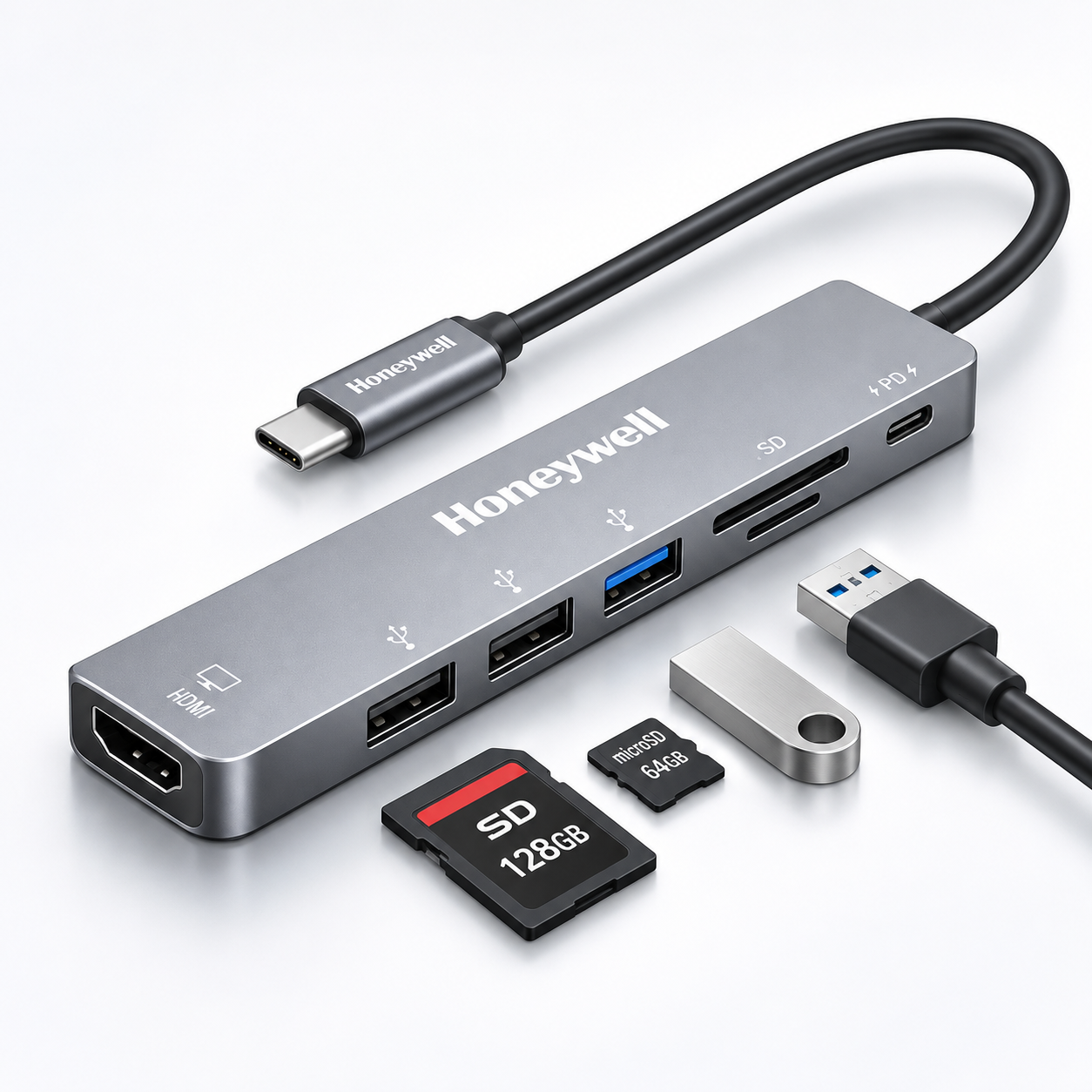
Honeywell 7-in-1 USB-C Hub
Check the current listing details and price on Amazon.
Check on Amazon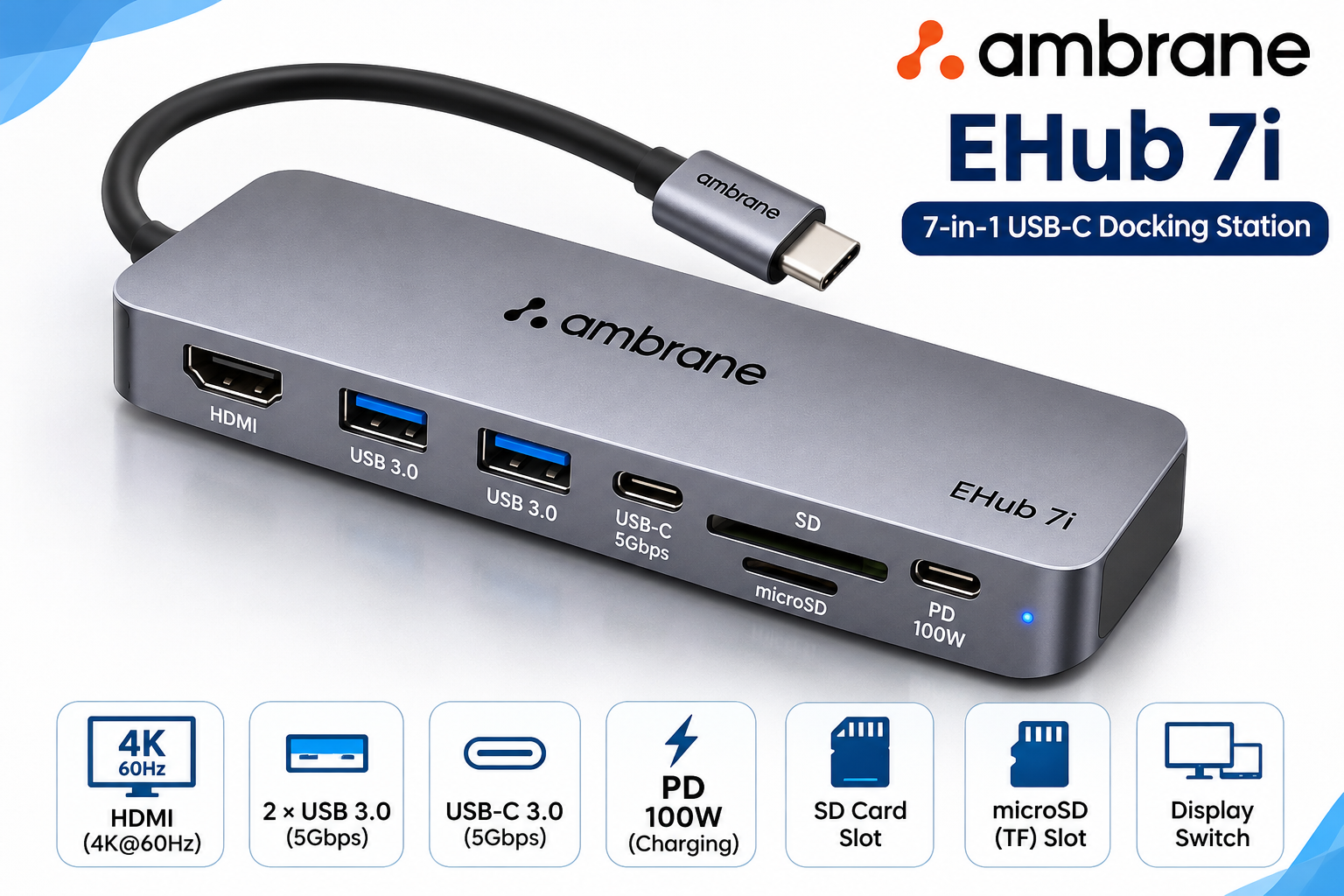
Ambrane EHub 7i
Check the current listing details and price on Amazon.
Check on AmazonFinal verdict
For a balanced 7-in-1 Type-C hub, Wozoyo’s published mix is compelling. Honeywell makes the most sense for a buyer who values its listed three-year warranty and does not need a separate USB-C data port. Ambrane EHub 7i is the better fit on paper for multiple faster peripherals. In every case, verify host video support, charging needs and current exact-model documentation before ordering.
Frequently asked questions
Is a 7-in-1 USB-C hub worth buying?
It can be useful when one compatible USB-C port needs to connect a display, charging input, USB devices and memory cards. It is less useful if you only need one extra USB port or your host device does not support the required features.
Do all USB-C laptops support HDMI?
No. A USB-C connector alone does not guarantee video output. The laptop's USB-C port generally needs compatible display output, such as DisplayPort Alt Mode, for an HDMI hub to provide a display connection.
Can these hubs charge a laptop?
They list USB-C Power Delivery input up to 100W. Actual charging depends on the charger, cable, laptop, host limits and the hub's own power use.
Does 100W PD mean the laptop receives 100W?
No. It normally describes the hub's maximum supported PD input or pass-through capability. The amount a laptop receives depends on the complete compatible setup.
Which hub is better for an external SSD?
Ambrane EHub 7i lists two USB-A 3.0 ports and one USB-C 5Gbps data port, while Wozoyo and Honeywell each list one 5Gbps USB-A port. Check the SSD, cable and host port as well.
Can I use these USB-C hubs with a phone?
Support varies by phone. USB OTG or data support is needed for peripherals, and compatible display-out support is needed for HDMI. Do not assume every phone enables all hub functions.
Do these hubs work with MacBook?
They are listed for compatible USB-C or Thunderbolt-equipped hosts, including MacBook use. Confirm the particular MacBook's port capabilities and display support before buying.
Which is better: Wozoyo, Honeywell or Ambrane?
Wozoyo is a balanced option on its published feature list, Honeywell suits warranty-conscious buyers with its listed three-year warranty, and Ambrane suits users who need more listed high-speed peripheral connections. The better choice depends on the host device and required ports.
Read the 65W vs 100W charger guide · Browse Tech Guides · Browse all Buying Guides